ComfyUI Trellis Node Packages Compared (2026)
Search "comfyui trellis node" and Google shows you three different GitHub repos, all claiming to be the Trellis 2 wrapper for ComfyUI. They are not the same. Install the wrong one and you lose an afternoon to dependency conflicts before realizing you picked the package that does not fit your workflow.
This review compares the three active ComfyUI Trellis node packages as of June 2026, stars, install method, stability, update cadence, and best use case, so you can pick in two minutes instead of after a failed install.
For the full Trellis 2 setup (install, workflow, troubleshooting), see the Trellis 2 ComfyUI complete guide.
TL;DR
| You want… | Install this |
|---|---|
| The default, works-for-most path | visualbruno/ComfyUI-Trellis2 |
| A sandboxed install that won't touch your main Python env | PozzettiAndrea/ComfyUI-TRELLIS2 |
| Text-to-3D inside the broader IF AI node suite | if-ai/ComfyUI-IF_Trellis |
If you have no strong preference, install visualbruno. It has the most stars, the most active changelog, a dedicated Windows guide, and is the reference this site uses in its complete guide.
The Three Packages at a Glance
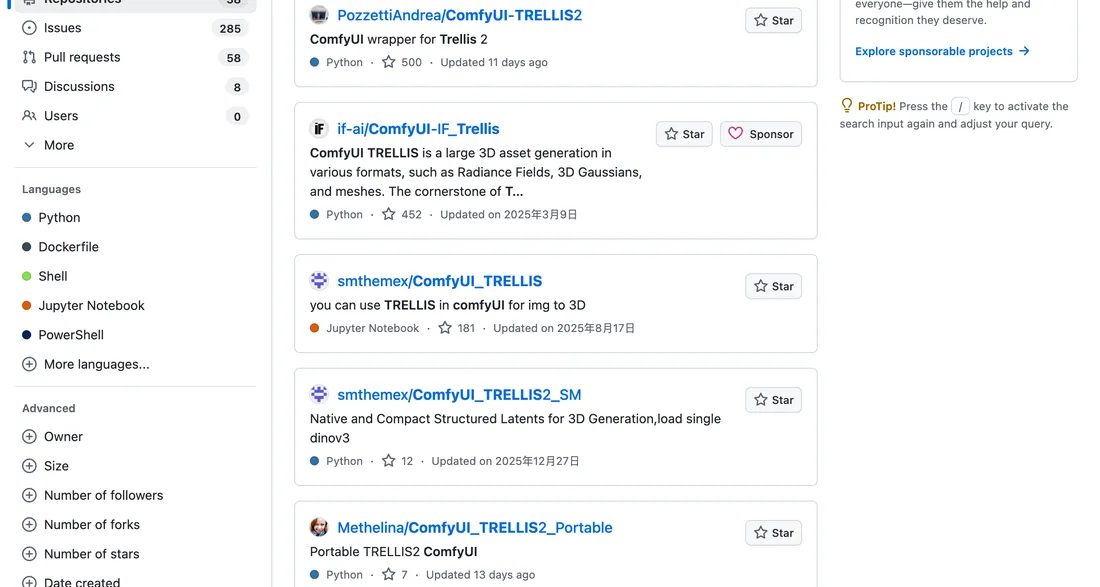
The GitHub search above shows the three Trellis 2 wrappers ranked by stars. visualbruno and PozzettiAndrea dominate; if-ai is the niche option. Source: GitHub search "trellis comfyui".
| Package | Repo | Stars (Jun 2026) | Last update | Install |
|---|---|---|---|---|
| visualbruno/ComfyUI-Trellis2 | GitHub | ~662 | Active (changelog) | Manager + manual clone |
| PozzettiAndrea/ComfyUI-TRELLIS2 | GitHub | ~500 | Active | Manager + pixi (experimental) |
| if-ai/ComfyUI-IF_Trellis | GitHub | Lower | Irregular | Manual clone |
Star counts are approximate and move fast, verify on the repo before installing.
visualbruno/ComfyUI-Trellis2
Best for: most users.
This is the most popular wrapper and the one with the most active development. Its README includes a full Installation Guide, a Changelog, a Requirements section, and an Acknowledgements block, the structure of a maintained project, not a one-off script.
Strengths:
- Highest star count (~662) of the three
- Active changelog with versioned updates
- Dedicated Windows installation notes
- Handles model download for you on first run
- Standard Manager install works out of the box
Weaknesses:
- Installs into your main ComfyUI Python environment (not sandboxed)
- Some dependencies (
flexgemm,o_voxel) still need manual fixes on Windows. See the troubleshooting master list
Install:
cd ComfyUI/custom_nodes
git clone https://github.com/visualbruno/ComfyUI-Trellis2.git
cd ComfyUI-Trellis2
pip install -r requirements.txt --upgrade
python install.py
PozzettiAndrea/ComfyUI-TRELLIS2
Best for: users who want an isolated install.
This package's standout feature is the pixi integration. pixi is a package manager that creates an isolated environment for the node's dependencies, so installing Trellis 2 does not pollute, or conflict with, your main ComfyUI Python install. For users with a carefully tuned ComfyUI environment, this is a meaningful advantage.
Strengths:
- Sandboxed install via pixi (does not touch main env)
- ComfyUI Manager "Install via Git URL" support
- Active maintainer
Weaknesses:
- pixi path is marked experimental: it breaks on some systems
- Lower star count (~500)
- One-click install uses an "experimental package" with a warning in the README: "Warning, uses experimental package to attempt a one click isolated install. Will download and use pixi package manager."
When to choose it: your ComfyUI Python environment is already fragile (other custom nodes with conflicting deps), and you want Trellis 2 cordoned off. If pixi fails, fall back to visualbruno.
if-ai/ComfyUI-IF_Trellis
Best for: users already on the IF AI node suite, or those focused on text-to-3D.
This is the niche option. It appears most prominently in text-to-3D searches, suggesting its positioning leans toward the prompt-to-mesh pipeline rather than image-to-3D. It is part of the broader IF AI custom node collection.
Strengths:
- Bundled with the IF AI node suite
- Text-to-3D emphasis
Weaknesses:
- Lowest visibility of the three
- Less active changelog
- Smaller community for support
When to choose it: you are already using IF AI nodes and want Trellis 2 integrated into that workflow. Otherwise, visualbruno is the safer default.
Head-to-Head Decision
| Question | Answer |
|---|---|
| "I just want it to work" | visualbruno |
| "My ComfyUI env is sacred, sandbox it" | PozzettiAndrea |
| "I want text-to-3D in the IF AI suite" | if-ai |
| "I'm on RTX 50 / CUDA 13" | visualbruno (most community fixes target it) |
| "I'm on 8GB VRAM" | visualbruno + GGUF (best low-VRAM support) |
Can I Install More Than One?
Technically yes, but do not. Multiple Trellis wrappers in custom_nodes cause node-name collisions, ComfyUI will list duplicate "Image to 3D" nodes and behavior becomes unpredictable. Pick one. If you want to switch, uninstall the first completely (delete its folder, remove its pip deps) before cloning the next.
Real Install Experience (What to Expect)
Star counts tell you popularity, not pain. Here is what each package actually feels like to install on a fresh ComfyUI in mid-2026.
visualbruno (the default): Plan for 30 to 90 minutes on a clean Windows install. The Manager path works most of the time. When it fails, it is almost always flexgemm on Windows (triton issue) or a CUDA mismatch. Once the nodes load without red errors, it stays working. Model download on first run adds 5 to 15 minutes depending on your connection.
PozzettiAndrea (pixi): The promise is a clean one-click install. Reality is mixed. When pixi cooperates, it is the smoothest path because dependencies are sandboxed. When pixi breaks (network issues, pixi version conflicts, experimental flag edge cases), debugging is harder than the manual path because the environment is opaque. Budget extra time if you choose this and are not comfortable reading pixi logs.
if-ai: Quietest install if you are already in the IF AI ecosystem. As a standalone Trellis 2 install, it has the least community troubleshooting material, so you are more on your own when something fails.
The pattern: visualbruno has the most failure cases documented (because it has the most users), which paradoxically makes it the easiest to fix when it breaks.
Switching or Removing a Package
If you picked wrong, or want to try another wrapper, do a clean removal first. Multiple Trellis wrappers in custom_nodes cause node-name collisions (duplicate "Image to 3D" nodes, unpredictable behavior).
To remove a Trellis package:
- Delete its folder from
ComfyUI/custom_nodes/(e.g.rm -rf ComfyUI-Trellis2). - Remove its pip dependencies if you do not need them elsewhere. The heavy ones are
flexgemm,o_voxel,cumesh. Check what each package installed before bulk-removing. - Delete downloaded models only if you are done with Trellis 2 entirely. They live in
ComfyUI/models/trellis2/ckpts/and are large; keep them if you will reinstall another wrapper. - Restart ComfyUI and confirm no Trellis nodes remain in the node browser.
Only after the old package is fully gone, clone the new one. Mixing two during install is the most common way to end up with a broken ComfyUI that lists duplicate nodes.
Frequently Asked Questions
Which ComfyUI Trellis node package is best?
For most users, visualbruno/ComfyUI-Trellis2: highest stars, most active updates, best Windows support. Choose PozzettiAndrea for a sandboxed install, or if-ai for text-to-3D inside the IF AI suite.
Are the three Trellis node packages the same?
No. They wrap the same Microsoft model but differ in install method (Manager vs pixi), update cadence, and focus (image-to-3D vs text-to-3D). visualbruno is the general-purpose default.
Can I run two Trellis wrappers at once?
Not recommended. They cause node-name collisions and duplicate nodes. Install only one at a time.
Which package works best on Windows?
visualbruno: it has the most Windows-specific fixes documented in the community and a dedicated installation guide in its README.
Next Steps
- Pick a package using the table above.
- Follow the install in the Trellis 2 ComfyUI complete guide.
- If you hit errors, check the troubleshooting master list.
Last reviewed: June 2026. Node package star counts and update cadence change weekly, verify on GitHub before installing.
Run it yourself in Trify3D
Keep reading from this topic
What Is MiniMax H3 Max? Fal's Faster H3 Explained
MiniMax H3 Max is fal's post-trained, speed-optimized version of MiniMax H3. Here is how it hits 35x throughput, what it costs, and when to use it over stock H3.
ReviewsHi3D Review 2026: Pricing, Specs, and Comparisons
Hi3D (Hitem3D) reviewed: 1536³ print-first generation, $19.90/mo list pricing, and a 31-review Trustpilot base. See where it beats Meshy and Tripo, and where it doesn't.
ReviewsBambu Studio vs OrcaSlicer vs Cura vs PrusaSlicer
Bambu Studio vs OrcaSlicer vs Cura vs PrusaSlicer (2026): slicing quality, printer support, multi-material, and calibration compared, plus a decision tree.