
Trellis 2 ComfyUI: Install & Workflow Guide
Type "trellis 2 comfyui", or the interchangeable searches "trellis comfyui" and "comfyui trellis", into Google and you land in a mess. The AI Overview at the top tells you to clone a repo and run install.py, but the Reddit thread right below it is full of people who tried that and spent six hours fighting flexgemm, o_voxel, CUDA 13, and HuggingFace 404s. Both are true. Trellis 2 in ComfyUI is powerful, and it is genuinely painful to set up on Windows in 2026.
This guide fixes that. You will learn what Trellis 2 actually is, which of the three competing ComfyUI node packages to install, how to install it cleanly on Windows (including RTX 50-series and CUDA 13), every common error and its fix, and the full image-to-3D, text-to-3D, and multiview workflows, with performance numbers from real hardware.
If you do not want to fight a local install at all, you can skip to how Trify3D fits in, but most of this guide is for people who want Trellis 2 running on their own GPU.
What is Trellis 2?
Trellis 2 (officially TRELLIS.2) is Microsoft's state-of-the-art image-to-3D generation model, released as microsoft/TRELLIS.2-4B, a 4-billion-parameter model hosted on Hugging Face. You feed it a single image (or a text prompt) and it outputs a high-fidelity 3D mesh with PBR (Physically Based Rendering) textures, exportable as GLB or OBJ.
Under the hood it uses Structured Latents (SLAT): a representation that separates 3D geometry from appearance so the model can generate clean shapes and then bake realistic materials onto them. The original Trellis (v1) proved the approach in late 2024; Trellis 2 raised fidelity and added proper PBR output, which is why it dominates the open-source 3D generation space in 2026.
The catch: Trellis 2 is a research model, not a product. Microsoft ships the weights and reference code, but the ComfyUI integration is community-built. That is where the three node packages and the install pain come from.
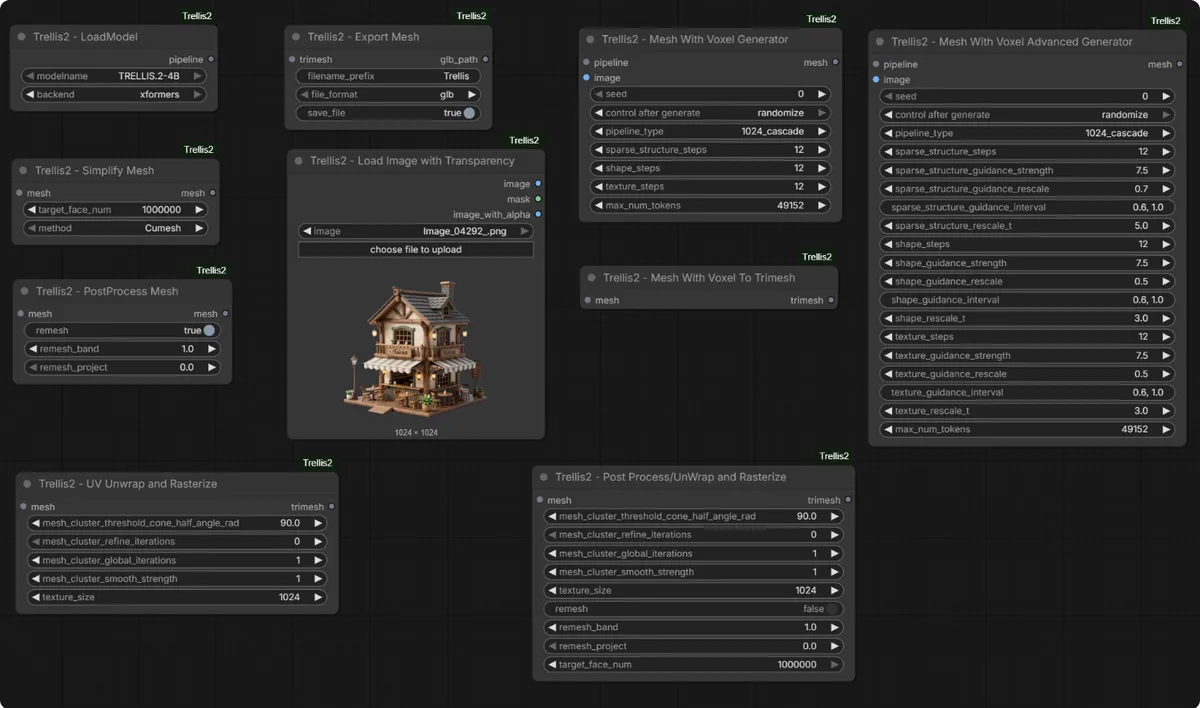
The mesh above is a typical Trellis 2 output: a single input image becomes a textured 3D model you can orbit and export as GLB. Source: visualbruno/ComfyUI-Trellis2 README.
Hardware & Software Requirements
Trellis 2 is heavy. Here is what you actually need before you start.
| Requirement | Minimum | Recommended |
|---|---|---|
| GPU | NVIDIA, 12GB VRAM | 16-24GB VRAM (avoids OOM) |
| CUDA | 12.1+ | 12.4-12.6 (stablest for Trellis 2) |
| Python | 3.10 or 3.11 | 3.11 (matches most node packages) |
| PyTorch | 2.1+ with CUDA | 2.4+ |
| Disk | 30GB free | 50GB+ (models + workflows) |
| NVIDIA driver | 525+ | 550+ (required for CUDA 12.6/RTX 50) |
RTX 50-series note: RTX 5090/5080 need CUDA 12.8 or 13.0 and driver 570+. This breaks several Trellis 2 dependencies. See the Windows + RTX 50 section.
If you are below 12GB VRAM, you are not locked out, the Low VRAM Mode section covers GGUF quantized models that run on 8GB cards.
⭐ ComfyUI Node Packages Compared
This is the first decision, and Google will not help you with it. There are three active ComfyUI wrappers for Trellis 2, and they are not interchangeable. Pick the wrong one and you waste an afternoon.
| Package | Repo | Stars (Jun 2026) | Best for | Install method |
|---|---|---|---|---|
| visualbruno/ComfyUI-Trellis2 | GitHub | ~662 | Most users; active changelog, Windows guide | Manual clone + Manager |
| PozzettiAndrea/ComfyUI-TRELLIS2 | GitHub | ~500 | One-click isolated install (pixi) | Manager + pixi (experimental) |
| if-ai/ComfyUI-IF_Trellis | GitHub | - | Text-to-3D focus, IF AI suite users | Manual clone |
Which should you pick?
- Default choice: visualbruno. It has the most stars, the most active changelog, a dedicated Windows installation guide, and handles the model download for you. Start here.
- Choose PozzettiAndrea if you want an isolated install that does not touch your main ComfyUI Python environment. It uses the
pixipackage manager to sandbox dependencies, cleaner in theory, but the pixi path is marked experimental and breaks on some systems. - Choose if-ai only if you specifically want the text-to-3D pipeline bundled with the broader IF AI node suite.
The rest of this guide uses visualbruno as the reference, with PozzettiAndrea notes where they differ. For the deep comparison, see ComfyUI Trellis Node Packages Compared.
Installation: Step by Step
There are three install paths. The Manager path is easiest, manual clone is most reliable, and pixi is the sandboxed experimental option.
Path A: ComfyUI Manager (easiest)
- Open ComfyUI, click Manager → Custom Nodes Manager.
- Search "TRELLIS". Install the visualbruno package from the highest version (try nightly if the stable fails).
- Restart ComfyUI. The manager downloads models on first run.
Reddit reports you may need to set
security_level = weakincomfy/user/manager/config.inifor the Manager to install the git URL. Do this only if Path A fails, then revert it. Source: r/comfyui testing thread.
Path B: Manual Clone (most reliable)
This is the path that works when the Manager does not.
cd ComfyUI/custom_nodes
git clone https://github.com/visualbruno/ComfyUI-Trellis2.git
cd ComfyUI-Trellis2
pip install -r requirements.txt --upgrade
python install.py
Then restart ComfyUI. Search "TRELLIS" in the node browser. You should see Image to 3D, Export, and related nodes.
Path C: PozzettiAndrea + pixi (sandboxed, experimental)
cd ComfyUI/custom_nodes
git clone https://github.com/PozzettiAndrea/ComfyUI-TRELLIS2.git
Then install via Manager "Install via Git URL", or let the package's prestartup_script.py pull pixi for an isolated environment. This avoids polluting your main Python env but is experimental. If it fails, fall back to Path B with the visualbruno package.
Optional: FlashAttention
Install FlashAttention to cut VRAM usage and speed up generation. Not required, but recommended on 12-16GB cards.
⭐ Install Trellis 2 on Windows + RTX 50 + CUDA 13
This is the section no other guide has, and it is the one filling Reddit support threads in 2026. If you have an RTX 5090 or 5080, the default install will fail because several Trellis 2 dependencies ship prebuilt wheels only for Python 3.12 and CUDA ≤ 12.6.
The confirmed working recipe (compiled from r/comfyui and r/StableDiffusion install help):
- Use a Python 3.12 ComfyUI embed, not 3.13. Several wheels (notably
cumesh) are 3.12-only. Building from source on 3.13 fails. - Install PyTorch for CUDA 12.8 or 13.0 matching your driver:
pip3 install torch torchaudio torchvision --index-url https://download.pytorch.org/whl/cu128 - Install
flexgemm: this is the #1 failure point. On Windows, edit itspyproject.tomland replace thetritondependency withwindows-triton, then:pip install flexgemm --no-build-isolation - Install
o_voxelwith deps isolated:python -m pip install o_voxel --no-deps --no-build-isolation - If HF download 404s the model config, manually download the
.jsonfiles from the TRELLIS.2-4B repo and place them inComfyUI/models/trellis2/ckptsnext to the.safetensors.
After this, the workflow runs and produces a valid .glb that opens in Blender. It is tedious, but it is the only known-good path for RTX 50 on Windows today. For the full dedicated walkthrough, see Install Trellis 2 on Windows (RTX 50 / CUDA 13).
⭐ Troubleshooting Master List
Every error below comes from real install attempts. If you hit one not listed here, it is likely a Python/CUDA mismatch, start by confirming python --version and nvcc --version.
| Error | Cause | Fix |
|---|---|---|
| Manager refuses to install git URL | security_level too high | Set security_level = weak in config.ini, install, revert |
flexgemm build fails on Windows | triton not on Windows | Replace triton with windows-triton in its pyproject.toml |
o_voxel install fails | Dep conflict | pip install o_voxel --no-deps --no-build-isolation |
cumesh wheel not found | Python 3.13 | Use Python 3.12 ComfyUI embed |
| HuggingFace 404 on model config | Incomplete download | Manually place .json files in models/trellis2/ckpts |
| CUDA out of memory | VRAM < 12GB or high res | Enable Low VRAM Mode, drop resolution to 512 |
| Generation extremely slow | Running on CPU | Verify CUDA: nvidia-smi shows GPU load during gen |
| TRELLIS node produces empty output | Nodes wired wrong / bad input image | Use clean image with background removed (e.g. Remove.bg) |
| Output mesh has holes/artifacts | Low resolution / no refine | Increase resolution, feed through a mesh refiner (FaithC) |
| Path errors on portable ComfyUI | Spaces in path | Move ComfyUI to a path without spaces |
Basic Workflow: Image to 3D
Once installed, the core workflow is short. Three nodes, one connection chain.
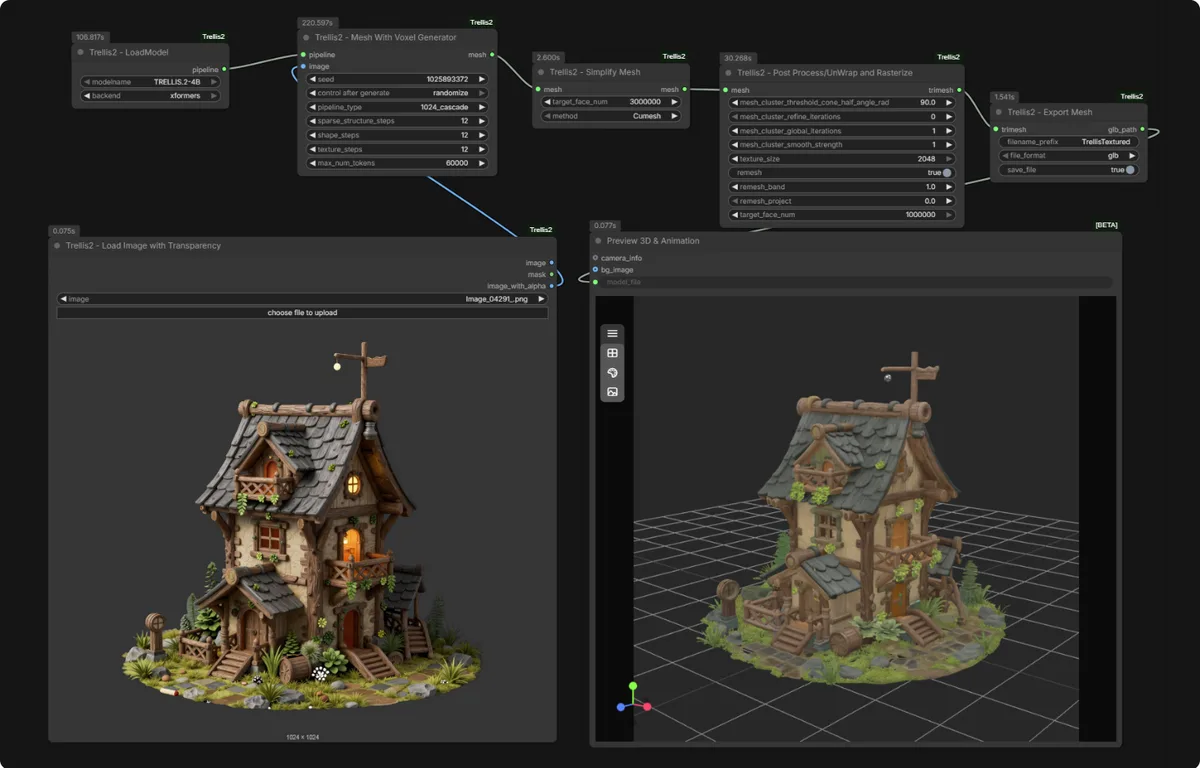
The node graph above shows the typical image-to-3D chain: load image, run the TRELLIS generation node, export the mesh. Source: visualbruno/ComfyUI-Trellis2.
Nodes required:
Load Image, your input photoTRELLIS Image to 3D, core generationTRELLIS Export, save as GLB/OBJ- (optional)
Preview 3D, view the result
Step-by-step:
- Right-click canvas → Add Node →
image→Load Image. Pick a clean photo with the background removed. - Add
TRELLIS Image to 3D. ConnectLoad Imageoutput →Image to 3Dinput. - Add
TRELLIS Export. ConnectImage to 3Doutput →Exportinput. - In Export, set Format = GLB (recommended for web/game engines), Resolution = 512 for speed, 1024 for quality, 2048 for production.
- Click Queue Prompt to run.
Preprocessing tip: Trellis 2 expects a subject on a clean background. Run your image through Remove.bg or a segmentation model first, a cluttered background is the #1 cause of "empty output" errors.
Advanced Workflow: Text to 3D
Trellis 2 also accepts text prompts. This is the path that the if-ai package focuses on.
Nodes:
Text Encode(or prompt node), your description (e.g. "a medieval sword with golden handle")TRELLIS Text to 3D, generate from textTRELLIS Apply PBR, apply Base Color, Roughness, Metallic materialsTRELLIS Export, export with embedded textures
Key parameters:
- Guidance scale: 7.5 for most use cases. Lower (5-6) for more creative variation.
- Steps: 30-50 balances quality and speed.
- Resolution: 1024 for game assets, 2048 for hero/production, 512 for real-time previews.
For a dedicated text-to-3D walkthrough, this hub's text section is the overview, the Trellis 2 ComfyUI workflow download post has ready-to-load workflow JSON files.
Multiview Workflow (new in 2026)
In February 2026, multiview support landed in Trellis 2. Instead of one image, you feed multiple camera angles and the model produces a far more accurate mesh, fewer holes, better back-of-object geometry.
The workflow chains a multiview generation front-end (turning one image into 4-6 synthesized angles) into the standard Image-to-3D pipeline. The result is dramatically cleaner topology, especially for complex subjects like characters and vehicles.
This is the single biggest quality jump since Trellis 2 launched. For the full setup, see Trellis 2 Multiview Workflow Tutorial.
Low VRAM Mode (8GB GGUF)
You do not need a 24GB card. The community ships GGUF-quantized Trellis 2 models that run on 8GB VRAM.
Configuration:
- Set resolution to 512
- Enable Low VRAM checkbox in the Image to 3D node
- Load a GGUF model (Q4 or Q5 quantization) instead of the full fp16 weights
- Disable post-processing remesh if not needed
Performance reference (RTX 3060 8GB): expect 3-6 minutes per mesh at 512 resolution. Close browser tabs and other GPU apps before running. Every megabyte counts at 8GB.
For downloadable GGUF workflows tuned for low VRAM, see Trellis 2 ComfyUI Workflow Download.
⭐ Trellis 2 vs Hunyuan 3D
This is a direct People Also Ask question, and there is no clean winner. They serve different needs.
| Feature | Trellis 2 | Hunyuan 3D (Hunyuan3D-2) |
|---|---|---|
| Maker | Microsoft | Tencent |
| Model size | 4B | ~1B (faster) |
| Input | Image + Text | Image + Text |
| Output | Mesh + PBR textures | Mesh + textures |
| VRAM (full) | 16-24GB | 8-16GB |
| Strength | Highest fidelity, PBR quality | Speed, lower VRAM, good enough for most |
| Weakness | Heavy, painful install | Slightly lower fidelity ceiling |
| License | Research (check terms) | More permissive for commercial |
Which to use?
- Trellis 2 if you have the GPU and want the best output quality, especially for hero assets and PBR materials.
- Hunyuan 3D if you are VRAM-constrained, want faster iteration, or need more commercial-friendly licensing.
Note: a r/StableDiffusion thread from 2026 argues Trellis 2 is "already getting dethroned" by newer open-source models, true for raw speed, but Trellis 2 still leads on PBR texture quality as of mid-2026. For the full comparison (including TripoSR), see Trellis 2 vs Hunyuan 3D vs TripoSR.
Performance Benchmarks
Real numbers, sourced.
| GPU | VRAM | Resolution | Time per mesh | Source |
|---|---|---|---|---|
| RTX 4070 Ti Super | 16GB | max (1024+) | ~213s | r/comfyui |
| RTX 3060 | 8GB | 512 (GGUF) | 3-6 min | Community reports |
| RTX 5090 | 32GB | 2048 | ~60-90s (est.) | RTX 50 users, unconfirmed |
Numbers vary wildly with guidance settings, resolution, and whether remesh/post-processing is enabled. Treat these as order-of-magnitude guides, not absolutes.
Export Formats
| Format | Best for | Notes |
|---|---|---|
| GLB | Web, game engines (Unity/Unreal/Godot) | Compact, single file, PBR textures embedded, recommended default |
| OBJ | 3D printing, older pipelines | Widely supported, separate MTL/material files |
| PBR (separate maps) | Custom pipelines needing per-map control | Base Color, Roughness, Metallic, Normal as separate files |
For game development, GLB is almost always the right choice. It is compact, supported everywhere, and bundles PBR textures in one file.
How Trify3D Fits In
Everything above is for running Trellis 2 locally in ComfyUI. That is the right answer if you have the GPU, want full control, and do not mind the install pain.
But if any of these are true, a hosted image-to-3D tool is the faster path:
- You do not have a 12GB+ NVIDIA GPU
- You need to batch-convert many images without babysitting a local queue
- You want production-ready topology without manual cleanup
- You hit the install errors above and would rather just get a model
Trify3D runs the image-to-3D pipeline in the cloud. Upload an image, get a clean 3D mesh back, no CUDA, no flexgemm, no GGUF. It is not a replacement for Trellis 2 if you want local, free, offline generation. It is the choice when you want the result without the setup.
Related Searches (Quick Answers)
Trellis 2 ComfyUI install: Use ComfyUI Manager (search "TRELLIS", install visualbruno), or manual clone per Path B. On RTX 50, follow the Windows + CUDA 13 section.
Trellis 2 ComfyUI download: Clone the visualbruno repo or grab GGUF workflows from the workflow post.
Trellis 2 ComfyUI GitHub: Three options: visualbruno, PozzettiAndrea, if-ai.
Trellis 2 multi-view: Use the multiview front-end to generate 4-6 angles, then feed into Image-to-3D. See the multiview post.
Trellis ComfyUI review: Strong fidelity and PBR, painful install. Real VFX verdict in the review post.
Frequently Asked Questions
How to install Trellis 2 on ComfyUI?
The easiest path is ComfyUI Manager: search "TRELLIS", install the visualbruno package. If that fails, manually clone https://github.com/visualbruno/ComfyUI-Trellis2.git into ComfyUI/custom_nodes, run pip install -r requirements.txt, then python install.py. On RTX 50-series, follow the dedicated Windows + CUDA 13 steps above.
Is Trellis 2 any good?
Yes, for fidelity and PBR texture quality, Trellis 2 leads open-source image-to-3D in 2026. The trade-off is weight (16-24GB VRAM for the full model) and a painful install. For VRAM-constrained or commercial use, Hunyuan 3D is a strong alternative.
Can I run Trellis 2 locally?
Yes, with an NVIDIA GPU (12GB+ for the full model, 8GB for GGUF quantized). It runs entirely offline once models are downloaded. No cloud, no API calls, yours to keep.
What is the difference between Trellis 2 and Hunyuan 3?
Trellis 2 (Microsoft, 4B) offers higher fidelity and better PBR textures but needs more VRAM. Hunyuan 3D (Tencent, ~1B) is faster, lighter, and more commercially permissive, with slightly lower fidelity ceiling. See the full comparison.
Does Trellis 2 support text-to-3D?
Yes. Trellis 2 accepts both image and text prompts. The text-to-3D pipeline uses a Text to 3D node plus optional PBR application.
What export formats does Trellis 2 support?
GLB (recommended, PBR embedded), OBJ, and separate PBR texture maps. GLB is the default for web and game engines.
Next Steps
- Install: pick a node package and follow the install path for your hardware.
- Run: start with the Image-to-3D workflow.
- Refine: try multiview and a mesh refiner for cleaner output.
- Skip the setup: if local is too much, Trify3D does image-to-3D in the cloud with no install.
Whatever you searched, "trellis 2 comfyui", "trellis comfyui", or "comfyui trellis", the path is the same: pick a package, follow the install for your GPU, run the image-to-3D workflow, refine with multiview if you need it.
Last reviewed: June 2026. Trellis 2 node packages update frequently, always check the repo changelog before reinstalling.
Run it yourself in Trify3D
Keep reading from this topic
How to Use Blender for 3D Modeling (Beginner's Guide 2026)
Learn how to use Blender for 3D modeling step by step: first model, essential hotkeys, export formats, and when the AI shortcut beats manual modeling.
TutorialsComfyUI 3D Models: Best AI Models & VRAM Guide
Generate 3D models in ComfyUI with Hunyuan3D 2.0 & TRELLIS.2. Compare workflows, VRAM needs, and export to Blender or STL. Try free online tool.
TutorialsHow to Make STL Files: 4 Ways, From Tinkercad to AI
Learn how to make an STL file four ways: free browser tools, parametric CAD, Blender sculpting, and AI image-to-3D. Includes export settings, print-readiness checks, and the exact tolerance values that matter.