
Install Trellis 2 on ComfyUI: Windows RTX 50 Guide
If you have an RTX 5090 or 5080, the standard Trellis 2 ComfyUI install will fail. The default instructions assume CUDA 12.x and Python wheels that simply do not exist for CUDA 13 and the newest Blackwell GPUs. Every Reddit support thread about Trellis 2 install failures in 2026 traces back to this mismatch.
This is the dedicated Windows + RTX 50 + CUDA 13 guide that the official repos do not give you. It walks through the full working recipe, with every error and its fix, so you go from failed install to a generated .glb in one pass.
For the broader Trellis 2 setup (what it is, workflows, troubleshooting), see the Trellis 2 ComfyUI complete guide.
Why RTX 50 Breaks the Default Install
Three things collide on RTX 50-series:
- CUDA 12.8 / 13.0 requirement. RTX 5090/5080 need driver 570+ and CUDA 12.8 or 13.0. The Trellis 2 dependencies were built against CUDA ≤ 12.6.
- Python wheel availability. Several wheels (
cumeshespecially) ship only for Python 3.12. If your ComfyUI embed is 3.13, the wheels are missing and source builds fail. - Windows-only gaps.
tritondoes not exist on Windows. Anything depending on it (flexgemm) must be patched towindows-triton.
The fix is not one command. It is a sequence. Follow it in order.
Prerequisites
Before you start, confirm:
- GPU: RTX 5090 or 5080 (this guide is for Blackwell; older cards use the standard install)
- NVIDIA driver: 570 or newer
- ComfyUI: portable/embedded install with Python 3.12 (not 3.13. See why below)
- Disk: 50GB+ free
If your ComfyUI uses Python 3.13, either reinstall a 3.12 embed or create a separate 3.12 environment. This is non-negotiable for RTX 50 right now.
Step 1: Install PyTorch for CUDA 12.8
Match PyTorch to your CUDA. For RTX 50 with CUDA 12.8:
pip3 install torch torchaudio torchvision --index-url https://download.pytorch.org/whl/cu128If you are on CUDA 13.0, use the cu130 index instead. Verify torch sees the GPU:
python -c "import torch; print(torch.cuda.is_available(), torch.cuda.get_device_name(0))"This must print True and your GPU name. If it prints False, your CUDA/driver mismatch is not resolved, fix that before continuing.
Step 2: Clone the Node Package
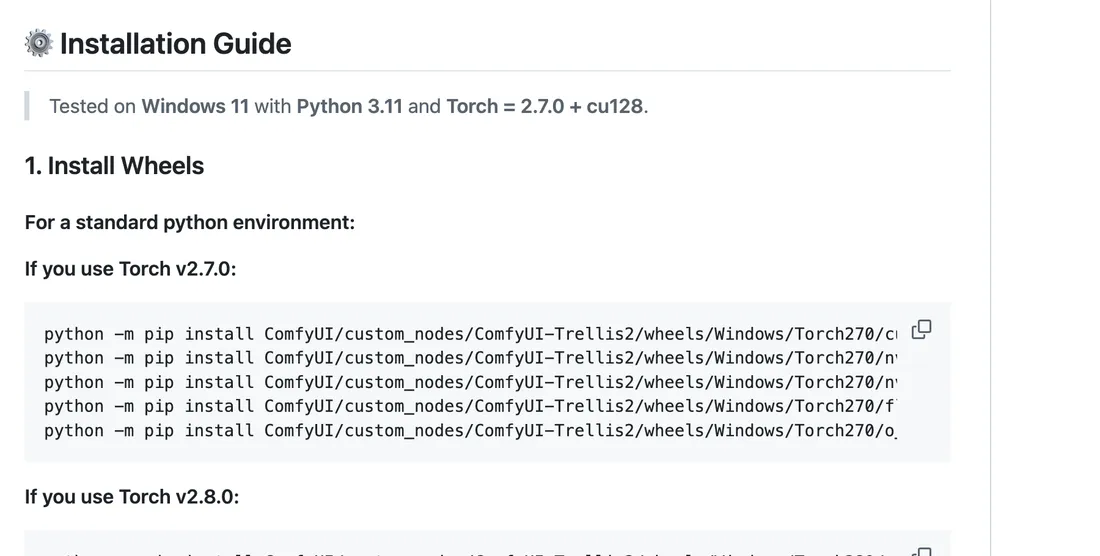
The commands above come straight from the visualbruno README. Source: visualbruno/ComfyUI-Trellis2.
Use visualbruno (best RTX 50 community support):
cd ComfyUI/custom_nodes
git clone https://github.com/visualbruno/ComfyUI-Trellis2.git
cd ComfyUI-Trellis2
pip install -r requirements.txt --upgrade
python install.py
This is where RTX 50 installs usually break. The next steps fix each failure.
Step 3: Fix flexgemm (the #1 failure)
flexgemm depends on triton, which does not exist on Windows. You must patch its pyproject.toml to use windows-triton instead.
- Locate the
flexgemmsource (in your pip cache or the cloned dep folder). - Open
pyproject.toml, find thetritondependency. - Replace
tritonwithwindows-triton. - Install with build isolation disabled:
pip install flexgemm --no-build-isolationSource of this fix: r/comfyui testing thread, where a user documented the exact
pyproject.tomledit. Some users report wheels are now provided, try a plainpip install flexgemmfirst; if it fails, apply the patch.
Step 4: Install o_voxel with deps isolated
o_voxel conflicts with other packages if installed normally. Use:
python -m pip install o_voxel --no-deps --no-build-isolationThe --no-deps --no-build-isolation flags prevent it from pulling conflicting versions or rebuilding the whole dependency tree.
Step 5: Handle the cumesh Python 3.12 requirement
cumesh wheels exist only for Python 3.12. If you are on 3.13, the install fails and source builds break.
Fix: use a Python 3.12 ComfyUI embed. From the portable install:
ComfyUI-Easy-Install\python_embeded> python.exe -m pip install o_voxel --find-links <wheels> --no-deps --no-build-isolation
There is no clean 3.13 workaround as of mid-2026. Switching to 3.12 is the reliable path.
Step 6: Fix HuggingFace 404 on model config
On first run, Trellis 2 tries to download model files from microsoft/TRELLIS.2-4B. Some users get a 404 on config .json files: the download partially fails.
Fix: manually download all .json files from the repo and place them in:
ComfyUI/models/trellis2/ckpts/
...next to the .safetensors weight files. Then re-run the workflow. The 404 goes away once the configs are present locally.
Step 7: Restart and verify
Restart ComfyUI. In the node browser, search "TRELLIS". You should see Image to 3D, Export, and related nodes. Wire up the basic image-to-3D workflow and run it.
Success looks like: a .glb file generated that opens correctly in Blender. If you get there, the RTX 50 install is complete.
Common RTX 50 Errors Quick Reference
| Error | Fix |
|---|---|
triton not found | Patch flexgemm to windows-triton |
cumesh wheel missing | Use Python 3.12 embed |
| CUDA out of memory | Enable Low VRAM Mode, drop to 512 |
| HF 404 on config json | Manually place json in models/trellis2/ckpts |
torch.cuda.is_available() False | Driver/CUDA mismatch, reinstall driver 570+ |
| Generation runs on CPU (very slow) | PyTorch installed without CUDA, reinstall with --index-url cu128 |
For errors beyond RTX 50 specifics, see the full troubleshooting master list.
Performance on RTX 5090
Once installed, RTX 5090 (32GB) is the ideal Trellis 2 card, enough VRAM to run the full model at 2048 resolution without GGUF. Estimated ~60-90s per mesh at 2048 (unconfirmed; community-reported range). At 1024, expect faster.
Post-Install Verification Checklist
Before you trust the install, run through this checklist. Each item catches a failure that would otherwise waste your first generation.
-
python --versionreports 3.12 (not 3.13) -
nvcc --versionreports CUDA 12.8 or 13.0 -
nvidia-smishows driver 570+ and your RTX 50 card -
python -c "import torch; print(torch.cuda.is_available())"printsTrue -
python -c "import flexgemm"runs without error -
python -c "import o_voxel"runs without error - ComfyUI starts with no Trellis-related errors in the console
- Searching "TRELLIS" in the node browser shows Image to 3D and Export nodes
-
models/trellis2/ckpts/contains both.safetensorsand.jsonconfig files - A test image-to-3D run at 512 produces a non-empty
.glbthat opens in Blender
If all ten pass, the install is solid. If any fails, the error message usually points at which step above to revisit. The most common post-install failure is a missing .json config (HF 404 residue), which is Step 6.
Common Misdiagnoses (Errors That Look Like RTX 50 Issues But Aren't)
Not every install failure on an RTX 50 machine is caused by RTX 50. These get blamed on the GPU when the real cause is elsewhere:
"CUDA out of memory" on a 32GB card. This is almost never a real VRAM shortage at 32GB. It is usually a resolution set too high (2048+ on first run), a workflow with remesh enabled, or the model running on CPU because CUDA did not actually load. Check nvidia-smi during generation: if GPU load is 0%, it is running on CPU, not out of VRAM.
"flexgemm not found" after a successful install. Usually a Python environment mismatch. You installed flexgemm into one Python, ComfyUI runs another. Confirm ComfyUI's embedded Python path and install into that exact one.
Generation works but output is empty/garbage. This is an input image problem, not an install problem. Trellis 2 needs a clean subject on a removed background. A photo with a busy background produces empty or distorted output even on a perfect install.
Extreme slowness despite RTX 5090. PyTorch likely installed without CUDA (CPU-only wheel). Reinstall with the --index-url cu128 flag from Step 1. A 5090 running Trellis 2 correctly is fast; if it crawls, CUDA is not engaged.
Frequently Asked Questions
Does Trellis 2 work on RTX 5090?
Yes, but not with the default install. You need CUDA 12.8/13.0, Python 3.12, and the flexgemm/o_voxel fixes documented above. Once those are applied, it runs and benefits from the full 32GB VRAM.
Why does the Trellis 2 install fail on Windows?
Three reasons: triton does not exist on Windows (breaks flexgemm), several wheels are Python 3.12-only (breaks on 3.13), and CUDA 13 wheels are missing (breaks RTX 50). The fixes above address each.
Can I use CUDA 13.0 instead of 12.8?
Yes, use the cu130 PyTorch index. Stability is slightly better on 12.8 as of mid-2026, but 13.0 works for most users.
Do I need Python 3.12 for Trellis 2 on RTX 50?
Strongly recommended. cumesh wheels are 3.12-only and source builds on 3.13 fail. Use a 3.12 ComfyUI embed.
Next Steps
- Follow steps 1-7 in order.
- Verify with the basic image-to-3D workflow.
- Stuck on a non-RTX-50 error? Check the complete troubleshooting list.
- Weighing Trellis 2 against Hunyuan 3D, Stable Fast 3D, or TripoSR? The ComfyUI 3D model guide compares all four by VRAM floor and use case.
Last reviewed: June 2026. RTX 50 support improves as wheels get rebuilt, recheck the repos for newer prebuilt packages.
Run it yourself in Trify3D
Keep reading from this topic
How to Use Blender for 3D Modeling (Beginner's Guide 2026)
Learn how to use Blender for 3D modeling step by step: first model, essential hotkeys, export formats, and when the AI shortcut beats manual modeling.
TutorialsComfyUI 3D Models: Best AI Models & VRAM Guide
Generate 3D models in ComfyUI with Hunyuan3D 2.0 & TRELLIS.2. Compare workflows, VRAM needs, and export to Blender or STL. Try free online tool.
TutorialsHow to Make STL Files: 4 Ways, From Tinkercad to AI
Learn how to make an STL file four ways: free browser tools, parametric CAD, Blender sculpting, and AI image-to-3D. Includes export settings, print-readiness checks, and the exact tolerance values that matter.