What Is a Mesh in 3D? Types & How It Works
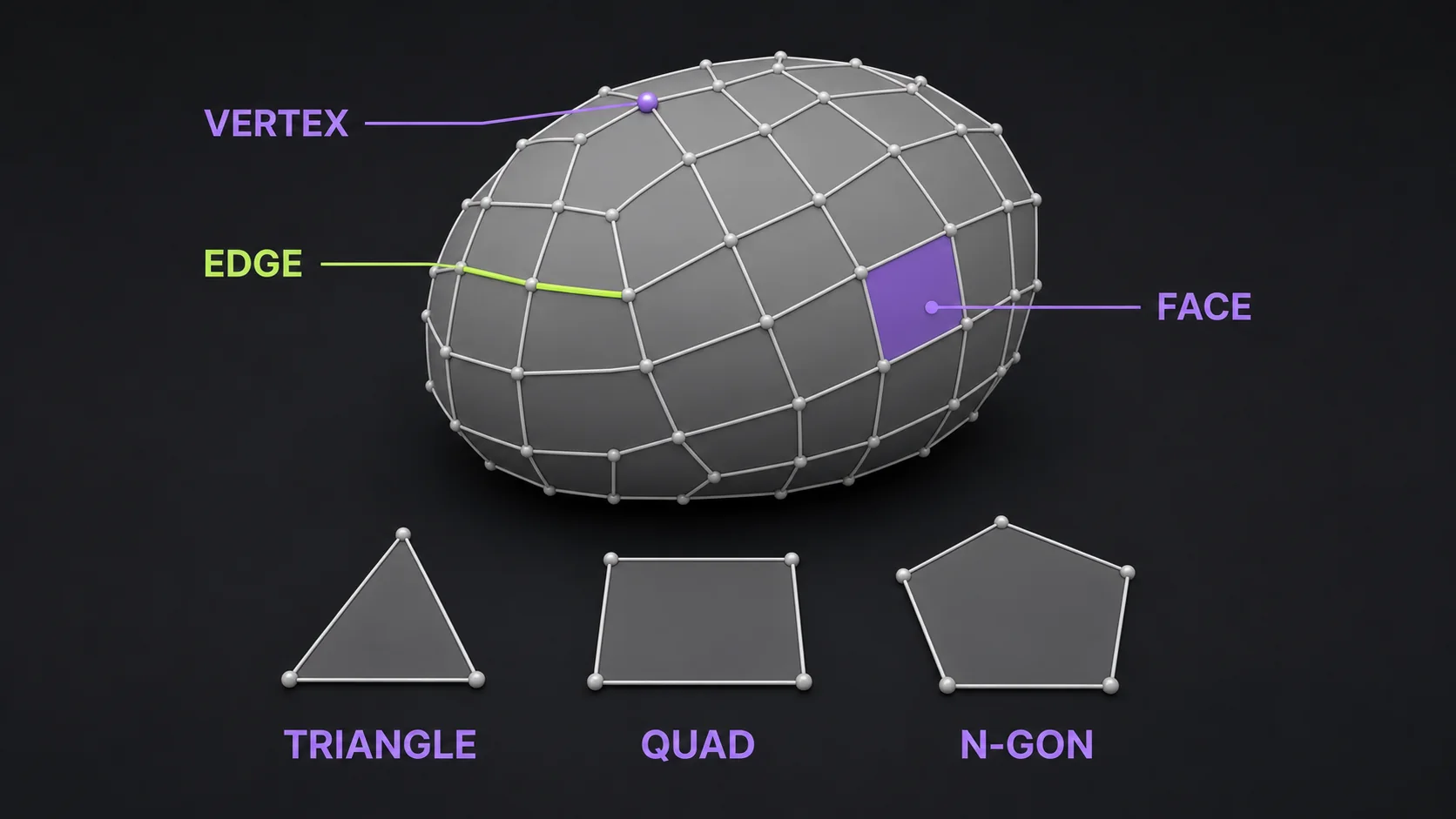
A mesh in 3D modelling is the geometric skeleton of a 3D object — a collection of vertices, edges, and faces wired together into polygons that define the shape of its surface. It is the structural framework underneath every character, product, building, and prop you see in a game, render, or 3D print. The faces are usually triangles (a triangle mesh) or quadrilaterals (quads), and occasionally other simple polygons known as n-gons (source: en.wikipedia.org/wiki/Polygon_mesh).
Most explanations stop at "vertices, edges, and faces." This guide goes further: the parts of a mesh, the three mesh types, how meshes are built, polygon counts and resolution, the pros and cons, file formats, mesh vs. model, and where AI is changing mesh creation. Last updated 2026-07-12.
What is a mesh in 3D modelling?
A mesh is the structural build of a three-dimensional model, made of polygons. Each polygon is locked to reference points along the X, Y, and Z axes, which gives the shape its height, width, and depth (source: techtarget.com/whatis/definition/3D-mesh). When you rotate a character in a game, slice a file for printing, or inspect a digital twin of a factory, the engine is reading and shading this polygon network.
A mesh by itself carries no color or texture. It is pure geometry — the wireframe "floor plan" that every later step builds on. Textures, materials, lighting, and rigging get layered on top of the mesh to turn it into a finished model. This separation is why you can take the same mesh and render it as shiny chrome, matte plastic, or a game asset just by swapping the materials.
What does a 3D mesh look like?
In its raw form a mesh looks like a wireframe cage wrapped around an object. At low polygon counts you can clearly see the individual triangles and quads; at high counts the polygons blend into a smooth surface. If you render only the edges instead of the shaded faces, the result is called a wireframe model — the basic structure with no surface detail (source: en.wikipedia.org/wiki/Polygon_mesh).
The parts of a 3D mesh: vertices, edges, and faces
Every polygon mesh is assembled from three core building blocks, plus a few supporting data types (source: en.wikipedia.org/wiki/Polygon_mesh):
- Vertices — points in 3D space, each stored as X, Y, Z coordinates. A vertex can also carry attributes like color, a normal vector for lighting calculations, texture coordinates, and blend weights for animation.
- Edges — straight lines connecting two vertices. An edge belongs to one or two faces.
- Faces (polygons) — the flat surfaces enclosed by edges. A triangle face has three edges; a quad face has four. Faces are what get shaded and rendered.
- UV coordinates — a separate 2D "unfold" of the mesh telling the renderer which part of a texture image lands on which polygon.
- Smoothing groups (surfaces) — optional markers that tell the renderer where to keep shading smooth and where to crease, so a single mesh can mix curved and hard surfaces.
Vertices are the fundamental data structure here. Beyond position, a vertex can hold reflectance, specularity, tangent vectors, and bone weights — all used by the vertex shader during real-time rendering (source: en.wikipedia.org/wiki/Polygon_mesh). Drop a vertex at each corner of a cube, connect them with edges, fill those edges with six quad faces, and you have a mesh. Scale that up and the face count climbs fast — polygon counts in games alone span from roughly 300-1,500 polys on a mobile mesh up to 200,000-350,000 polys for a hero character on a high-end PC (source: docs.unity3d.com; forums.unrealengine.com).
What are the types of meshes in 3D modelling?
Meshes split along two axes: the shape of their polygons, and how their surfaces are mathematically defined. Polygon shape matters most for day-to-day modeling and rendering.
Triangle, quad, and n-gon meshes
The faces of a mesh are built from one of three polygon types (source: techtarget.com/whatis/definition/3D-mesh; selfcad.com/blog/what-is-a-3d-mesh):
- Triangle mesh — built entirely from three-sided faces. Triangles are the simplest polygon and the only shape all rendering hardware guarantees it can handle, so every mesh gets converted to triangles before it hits the GPU. They model many kinds of objects easily and accurately.
- Quad mesh — built from four-sided faces. Quads deform cleanly under animation, which makes them the standard for characters, clothing, and anything that bends. Most modeling happens in quads, then exports as triangles.
- N-gon mesh — faces with five or more sides, like pentagons or hexagons. N-gons speed up blocking out complex shapes but cause unpredictable shading and bad deformation, so artists clean them into quads or triangles before delivery.
Polygon, NURBS, and subdivision surface meshes
Beyond polygon shape, three surface definitions cover how the mesh is modeled (source: danthree.studio; techtarget.com/whatis/definition/3D-mesh):
- Polygon models — the standard mesh, where surfaces are explicit sets of faces. Best for games, film, and anything that needs real-time rendering.
- NURBS models — non-uniform rational B-spline surfaces defined mathematically, not by polygons. NURBS produce smoother curves than polygon models (which are built from straight edges), but they need more computation and dominate automotive and industrial CAD. They convert to polygon meshes for rendering.
- Subdivision surface models — a hybrid. A coarse polygon cage gets smoothed by an algorithm into a dense, rounded surface. This combines the control of polygons with the smoothness of NURBS, and is how most organic characters and products are modeled today.

High poly vs. low poly meshes
Polygon count — "poly count" — is the single number that drives how detailed a mesh is and how hard it is to render (source: danthree.studio; techtarget.com/whatis/definition/3D-mesh).
High poly meshes pack a large number of faces to capture fine detail: wrinkles, muscle, rivets, and filigree. They look great in still renders and film, where accuracy matters most, but they are heavy and slow to load. In games, a high-detail character typically lands around 20,000-40,000 triangles, and hero characters on high-end hardware push 200,000-350,000 polygons (source: 3d-ace.com, 2024-01; forums.unrealengine.com).
Low poly models use fewer polygons. They are less detailed but render fast and load quickly, which is why they dominate real-time games, web 3D viewers, and online product configurators. A low-detail game character sits around 10,000-20,000 triangles, and a mobile mesh often lands between 300 and 1,500 polygons (source: 3d-ace.com, 2024-01; docs.unity3d.com). The trade is straightforward: more polygons means more detail at the cost of more computation.
Mesh resolution and optimization
Mesh resolution is the polygon count, and it sets the detail ceiling. Higher resolution means a more detailed model but more computational resources; lower resolution means less detail but faster rendering (source: selfcad.com/blog/what-is-a-3d-mesh).
The standard workflow bridges the two: build a high poly mesh first, then bake its detail down into a low poly version that keeps the silhouette but cuts the face count. This mesh optimization removes unnecessary vertices and polygons while preserving visual quality, using normal maps to carry the lost detail. The result ships light enough for real-time use without looking low-fidelity.

How is a 3D mesh created?
Meshes come from several methods, each suited to a different level of detail, precision, and source material. In practice they are combined (source: danthree.studio; techtarget.com/whatis/definition/3D-mesh; capnor.com):
- Polygonal modeling — a human artist builds the mesh by hand in software like Blender, Maya, or 3ds Max, placing vertices and shaping faces. Slow but gives total control over topology.
- Sculpting — the artist shapes the mesh like digital clay in ZBrush or Blender's Sculpt mode. Great for organic detail, usually followed by retopology into a clean low poly mesh.
- 3D scanning — a laser or structured-light scanner captures a real object's surface as a dense point cloud, then software converts it into a mesh.
- Photogrammetry — reconstructs a mesh from many overlapping photos of a real-world object, ideal for creating accurate models of existing assets.
- Procedural and parametric modeling — algorithms and math functions generate the mesh, useful for terrain, foliage, fluids, and repeatable structures.
- AI generation — the newest path. Feed an AI 3D generator a single image or text prompt and it outputs a textured mesh in minutes, skipping most manual modeling. Pick the right method with our how to make a 3D model decision tree.

Once the mesh exists, you add 2D textures mapped onto its surface (UV mapping) and define how light interacts with it (materials and shading). These optical properties are what make the model look real for its use case.
Mesh topology and why it matters for animation
Topology is the arrangement of polygons across a mesh, and it decides whether the model behaves well. Poor mesh topology causes non-uniform deformation during animation, rendering artifacts, and difficulty applying textures (source: capnor.com).
The fix is edge loops — continuous rings of edges that wrap around areas that will move, like a character's shoulder, elbow, or mouth. When polygons are carefully laid in edge loops, the mesh deforms cleanly during animation; without them, joints pinch and collapse (source: techtarget.com/whatis/definition/3D-mesh). This is why modeling for animation is methodical work: the polygon layout has to be planned for movement, not just for the final pose.
Topology is also what makes a mesh easy or painful to edit later. Unlike procedural or parametric models, where you can change a parameter and watch the shape update, a finished mesh often requires significant rework for major structural changes (source: capnor.com).

Pros and cons of 3D meshes
Meshes are the default 3D representation for a reason, but they come with real tradeoffs (source: capnor.com).
Advantages of mesh models
- Flexibility — meshes handle shapes from simple boxes to highly complex organic forms.
- Detailed surfaces — a high poly mesh supports realistic textures and fine detail.
- Texturing and shading compatibility — UV mapping lets textures land precisely, and meshes work with most shaders and lighting setups.
- Performance optimization — polygon count can be cut to hit a frame-rate or file-size target while keeping the essential shape.
- Small footprint — meshes take far less disk space than raw point clouds, and store in many interchangeable file formats.
Limitations of mesh models
- Complex to create well — detailed high poly meshes are time-consuming, and topology is hard for beginners to master.
- Topology problems — bad polygon arrangement causes deformation glitches and rendering artifacts, and cleanup is labor-intensive.
- Limited realism on curves — a mesh approximates curved surfaces with flat polygons, so smooth areas look faceted unless you spend many polygons, which raises computational cost.
- Hard to modify after the fact — large structural changes to a finished mesh often distort its geometry, unlike editable parametric models.
Mesh vs. model: what is the difference?
The clearest distinction comes from game developers: a mesh is part of a model. The mesh holds the vertex and face data that define the shape; the model bundles that mesh with the textures, materials, transforms, and other data needed to actually render it (source: gamedev.stackexchange.com).
Think of it as body and clothing. The mesh is the bare body — geometry and nothing else. The model is the body plus skin, clothes, posture, and animation. One mesh can be reused across many models, and a single model like a game character often holds several meshes (body, hair, armor, weapon).
This is also why "mesh" and "model" get used interchangeably in casual speech but mean different things in a pipeline. When you export from Blender, the mesh geometry goes out; when you load an asset in Unity, you are loading a model that references that mesh.

Polygon mesh vs. volumetric mesh
There is a related distinction worth knowing. A polygon mesh explicitly represents only the surface of an object — the volume inside is implicit. A volumetric mesh explicitly represents both the surface and the interior, which is what finite-element simulation and medical analysis need (source: en.wikipedia.org/wiki/Polygon_mesh). For rendering, games, and printing, a polygon mesh is what you want. For physics simulation, volumetric meshes take over.
Mesh file formats
Meshes have to be saved in a format other software can read. The right choice depends on whether you are printing, rendering, animating, or editing (source: en.wikipedia.org/wiki/Polygon_mesh):
| Format | Best for | Notes |
|---|---|---|
| STL | 3D printing | Triangle mesh only; no color or texture. The default print format. |
| OBJ | interchange | ASCII geometry with UVs; widely supported, no animation. |
| FBX | animation, game engines | Carries mesh, rigging, materials, and animation. |
| GLB / glTF | web, AR, real-time | The "JPEG of 3D." Bundles mesh, textures, and animation in one file. |
| PLY | scanning, point clouds | Binary or ASCII; common from 3D scanners. |
| 3MF | 3D printing | Like STL but supports color, materials, and multiple parts. |
| DAE (COLLADA) | interchange | Universal format designed to prevent incompatibility. |
| .blend / .3dm | native editing | Blender and Rhino source files; not for interchange. |
For a deeper walkthrough of export targets, learn how to export 3D models to GLB and FBX. If your end goal is printing from a photo, convert your image to STL through the full pipeline.
Where 3D meshes are used
Meshes are the common language across nearly every industry that works in 3D (source: selfcad.com; capnor.com):
- Video games and film — characters, environments, vehicles, and props are all meshes, then textured, rigged, and animated.
- Architecture and construction — buildings, interiors, and landscapes are modeled as meshes for visualization, BIM integration, and clash detection before construction.
- Industrial facilities and digital twins — mesh models of plants, refineries, and offshore platforms support equipment layout, clash detection, retrofit planning, and safety analysis.
- Oil, gas, and energy — detailed meshes of piping and structural frames enable precise measurement, inspection, and maintenance planning.
- Product design and manufacturing — mesh prototypes let manufacturers catch design flaws and run reverse engineering and quality control before a physical part is made.
- 3D printing — every print starts as a mesh file, usually STL or 3MF, sliced into layers.
- Medical imaging — CT and MRI scans get reconstructed into mesh models of bones and organs for diagnosis and surgical planning.
- Heritage preservation — museums and archaeologists use meshes to digitally archive and exhibit historical structures and artifacts.
- Virtual and augmented reality — meshes build the immersive environments and overlay objects users interact with, optimized for real-time rendering.
How AI is changing mesh creation
Manual mesh modeling takes days for a single character. AI 3D generators compress that to minutes by predicting a mesh directly from an image or text prompt (source: selfcad.com/blog/what-is-a-3d-mesh). The mesh comes out pre-textured and export-ready for STL, GLB, or OBJ, which means a non-artist can go from reference photo to printable or game-ready asset without opening Blender.
The tradeoff is topology, and it matters more than most tools admit. AI meshes often arrive as dense triangle soup that needs cleanup before serious animation or CAD use. Different engines also produce noticeably different topology from the same input, which is the core case for a multi-model aggregator: generate the same image across several engines, compare the meshes side by side, and keep the one that fits the use case rather than betting on a single engine. For concept work and printing, the raw output ships as-is. For a hero production asset, treat the AI mesh as a starting point and retopologize. To weigh the options, compare the best AI 3D model generators.
Frequently Asked Questions
What is the difference between a 3D model and a mesh?
A mesh is just the geometry — the vertices, edges, and faces that define shape. A model wraps that mesh in textures, materials, rigging, and animation. One mesh can be reused across many models, and a model can hold several meshes.
Is an STL a mesh?
Yes. STL is a mesh file format that approximates a surface as a network of interconnected triangles. It stores no color, texture, or scale data, which keeps it lightweight and makes it the default format for 3D printing.
How do you turn a photo into a 3D mesh?
Upload the photo to an AI image-to-3D tool and it generates a textured mesh in minutes. For higher fidelity, photogrammetry reconstructs a mesh from 20 to 200 photos of a real object. A 3D scanner captures a physical surface directly into a mesh. Start by turning a 2D image into a 3D mesh.
A mesh is the part you cannot skip — every render, print, and game asset starts as one. The fastest way to actually see one is to feed a photo to an AI generator and inspect the triangles it spits out. Turn your image into a 3D model with Trify3D, add textures to your 3D models once the geometry is ready, or back up to the basics and start with what 3D actually means.
Run it yourself in Trify3D
Keep reading from this topic
What Is 3D? Definition, 2D vs 3D & How It Works
What is 3D? Three-dimensional means objects have width, height, and depth. This guide covers 2D vs 3D, 3D modeling, printing, art, movies, and gaming.
GuidesWhat Is Meshmixer? The Free 3D Mesh Editor (2026 Guide)
Meshmixer is Autodesk's free 3D mesh editor for sculpting, repairing, and prepping STL/OBJ files. Learn what it does and the best 2026 alternatives.