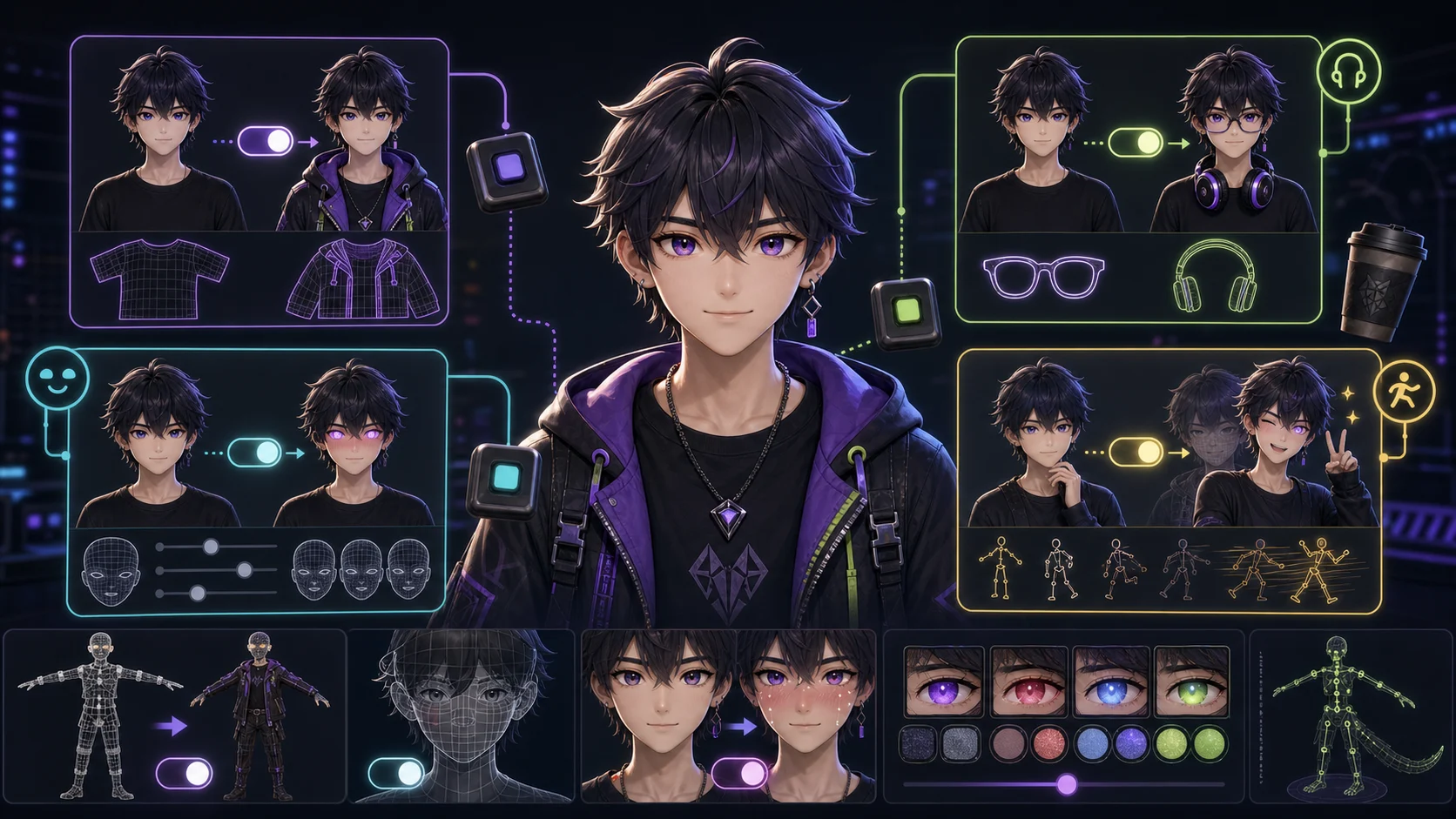
What Is a Toggle for a 3D VTuber Model?
Most answers to "what is a toggle" stop at "it's something you turn on and off." That's technically true but useless when you're staring at a model file trying to figure out why a blush layer won't switch, or why your jacket toggle breaks the rig.
This guide covers what a toggle actually is on a 3D VTuber model, the four kinds people build, how they work under the hood (BlendShapes, mesh visibility, texture atlases), and how to bind them to hotkeys in VTube Studio, Warudo, and VSeeFace. I've kept the software steps specific and the technical claims sourced: where I'm describing community workflows rather than a spec, I say so. Last updated 2026-07-10.
What is a toggle on a 3D VTuber model?
A toggle on a 3D VTuber model is any visual element (a piece of clothing, an accessory, a facial feature, or a triggered pose) that you can turn on, turn off, or swap while you are streaming. You bind each toggle to a keyboard hotkey (or sometimes a facial expression), so you change your avatar live without leaving character or tabbing out of your game.
The key distinction: tracking handles continuous motion (where your head looks, when you blink), while toggles handle discrete state changes (jacket on or off, normal eyes vs heart eyes). Your face drives one; your keyboard drives the other. A well-rigged model leans on both.
The four kinds of toggles people actually build
1. Clothing changes
Taking a jacket off, putting on a hat, switching into swimwear, or going from a casual outfit to a formal one. This is the most common toggle streamers commission, because outfit variety is what keeps a model feeling fresh over hundreds of hours of streaming.
Technically these are usually mesh-visibility toggles: the jacket mesh and the no-jacket body mesh both exist in the file, and the toggle flips which one is visible. The body underneath has to be modeled too; you can't just hide the jacket and hope the chest is there.
2. Accessories
Props that spawn on demand: glasses, a gaming controller, a cup of coffee, headphones, a weapon. These are the cheapest toggles to commission because each one is a single object you show or hide.
In VTube Studio these are handled with Item Scenes: you place the asset, group it into a scene, then bind a hotkey that toggles that scene on and off.
3. Facial features and expressions
Glowing eyes, anger veins, tears, blushing, heart eyes, animal ears popping out, fangs showing. This is where toggles get technically interesting, because the face is already densely rigged for tracking.
These use BlendShapes (called shape keys in Blender). A blendshape is a slider from 0 to 1 that morphs the mesh between two states. For a blush, you either morph a blush-shaped mesh in, or you shift a texture atlas so a different colored region shows on the cheeks. The second approach, a texture atlas plus a blendshape that offsets the UV, is how texture toggles work in apps like VSeeFace.
4. Triggered poses and animations
Not a static toggle but a one-shot: the model waves, lies down, plays an idle animation, or strikes a pose. These are usually driven by a blank blendshape or an animation clip that fires when you hit the hotkey, then returns to tracking when it finishes.
The line between "expression toggle" and "animation toggle" gets blurry, since an angry face that comes with clenched fists is both. Most riggers treat them as the same category and just bind the combined state to one key.
How toggles actually work under the hood
There are only three mechanisms. Every toggle is one of them, sometimes combined.
| Mechanism | What it does | Best for | File size impact |
|---|---|---|---|
| Mesh visibility on/off | Flips which of two stored meshes renders | Clothing swaps, outfit variations | High (both meshes stored) |
| BlendShapes (shape keys) | Morphs mesh from base to target via a 0 to 1 slider | Expressions, facial features, deformation | Low (stores deltas only) |
| Texture shift via blendshape | Shifts UV offset across a texture atlas | Color/pattern changes: blush, glows, markings | Low (one atlas, offset moves) |
Mesh visibility on/off. The simplest. Two versions of a body part exist in the file; the toggle flips which renders. Heavy on file size (you store both meshes), trivial to set up. Used for most clothing swaps.
BlendShapes (shape keys). A stored delta that morphs the mesh from its base shape to a target shape. A single slider, 0 to 1. Used for expressions, facial features, and any deformation. Blender calls them shape keys; Unity and most VRM tooling call them BlendShapes. VRM's expression system is built on these. The VRM format is an open standard maintained by the VRM Consortium, so any app that reads VRM can read these blendshapes.
Texture shift via blendshape. For things that are a color or pattern change rather than a shape change: a blush, a face texture, an emission glow. You build a texture atlas with multiple states laid out side by side, then a blendshape shifts the UV offset so a different region of the atlas displays. This is the approach recommended in the VTuber tech community for texture toggles that need to work across VSeeFace, Warudo, and other VRM apps.
Once the toggle exists on the model, none of these mechanisms do anything by themselves. You have to bind them to something a human can trigger (almost always a keyboard hotkey) inside your tracking software.
How to set up toggles in VTube Studio
VTube Studio is the most common tracking app, and its toggle setup is consistent regardless of toggle type. The steps come from the app's own Expressions documentation.
- Open your model in VTube Studio.
- Click the pink gear icon to open settings.
- Go to the Hotkeys tab (the clapperboard icon).
- Click the + icon to add a new hotkey.
- Choose a Hotkey Action (see below), assign it, and bind it to a physical key or on-screen button.
The action you pick depends on what the toggle is:
- Set/Unset Expression: for facial toggles built in the Expression Editor (an angry face, a blush, heart eyes). Create the expression in the Expression Editor first, then bind it here.
- Toggle Item Scene: for accessories and props. Group the items into an Item Scene first (left-side menu, green three-stars icon, Create New Item Scene), then toggle that scene.
- Art Mesh Color Preset: for color shifts (hair color, eye color, clothing color). Set the art mesh colors you want, then save them as a preset bound to a key.
All three end at the same Hotkeys menu. The difference is what you prepared beforehand.
How toggles differ in Warudo and VSeeFace
VTube Studio is built around Live2D-style 2.5D models but supports 3D VRM too. If you're a pure 3D VTuber, you're more likely on Warudo or VSeeFace, and the binding UI differs.
VSeeFace reads VRM files directly. VRM has a built-in expression system (the blendshapes are baked into the file as named expressions), and VSeeFace lets you bind those expressions to hotkeys in its settings. Texture toggles that work via UV-offset blendshapes show up automatically. VSeeFace is free, Windows-only, and favored for stability. It's the go-to for standard webcam tracking.
Warudo is the more flexible option and is widely considered the best for interactive collabs, custom 3D environments, and iPhone/iOS hand tracking. Its node-graph system lets you build more complex toggle logic (a toggle that only works in a certain scene, a toggle triggered by a Twitch redeem) at the cost of more setup. Warudo also reads VRM natively.
VNyan sits between the two: free, node-graph driven like Warudo, customizable, but with a steeper configuration curve.
If your model is a VRM exported from VRoid Studio, all three apps will read its expressions. The choice is about how much toggle logic you want to build, not whether your toggles will work.
| Software | Price | Platform | Tracking | Toggle logic | Best for |
|---|---|---|---|---|---|
| VSeeFace | Free | Windows | Webcam | Hotkeys | Stable, simple webcam tracking |
| Warudo | Free (Steam) | Windows | Webcam + iPhone | Node graph | Collabs, custom environments, Twitch-triggered toggles |
| VNyan | Free | Windows | Webcam + iPhone | Node graph | Customizable logic without Warudo's scope |
| VTube Studio | Free (paid tier) | Win/Mac/Mobile | Webcam | Hotkeys | Live2D-first, also supports 3D VRM |
The 3D VTuber workflow, start to finish
Toggles don't exist in isolation; they live inside a pipeline. The standard free path, confirmed across the VTuber community and the apps' own docs:
- Build the model in VRoid Studio. Free, beginner-friendly, exports VRM. This is where most toggles that are outfit- or accessory-based get added, because VRoid's editor handles them natively.
- Customize in Blender (if needed). For props, clothing, or toggles VRoid can't produce, take the VRM into Blender, add the meshes or blendshapes, and re-export. Higher learning curve, no quality ceiling.
- Track and animate in Warudo or VSeeFace. Load the VRM, bind toggles to hotkeys, calibrate face tracking.
- Stream in OBS Studio. Capture the tracking app's window and send it to your platform.
The VRM format is the connective tissue. It carries your model, its blendshapes, and its expression bindings between every tool in the chain. If a toggle breaks when moving between apps, it's almost always because the blendshape wasn't exported into the VRM, not because the receiving app can't read it.
Common toggle problems and fixes
The toggle works in Blender but not in VTube Studio / Warudo / VSeeFace. The blendshape wasn't exported into the VRM. VRM only ships the expressions you explicitly register in its expression list. Re-export from Blender with the shape keys added to the VRM expression mappings.
A clothing toggle reveals a hole or missing body underneath. The body mesh under the clothing was never modeled. You can't just hide the jacket; the chest, arms, and any skin the clothing covered need to exist as separate meshes. This is a modeling fix, not a rigging one.
The blush or texture toggle doesn't shift. The UV-offset blendshape is either not set up, or the texture atlas regions aren't laid out correctly. The blendshape needs to move the UVs by an exact integer offset to the next region in the atlas. Half an offset produces a smeared result.
Toggles fire on the wrong hotkey or conflict. Two toggles bound to the same key, or a toggle bound to a key your game or OBS uses. Reassign in the Hotkeys menu; avoid keys near WASD if you game while streaming.
Expression toggles look stiff or snap abruptly. Most apps let you set a transition time so the blendshape eases in rather than snapping from 0 to 1. VTube Studio and Warudo both support this; check the expression's settings, not the hotkey's.
What this means for your model
If you're commissioning a model, toggles are the line item that drives price and delivery time fastest. Each toggle is modeling work (the mesh or blendshape has to exist), rigging work (it has to be bound correctly), and testing work (it has to survive the VRM export and import into your tracking app). A model with "lots of toggles" is a model that took longer to build, which is why commission sheets list them separately.
If you're building your own, the order that minimizes pain: get the base model tracking first, add mesh-visibility clothing toggles second (they're the most forgiving), then tackle expression and texture toggles last (they demand clean blendshapes and a correct texture atlas). Trying to rig every toggle before the model tracks is how you end up debugging twelve broken things at once.
Bring it together with Trify3D
Toggles and custom props need source meshes to work from. If you want a unique accessory (a prop weapon, a custom hat, a figure your avatar holds), Trify3D can generate a 3D model from a single image in minutes, giving you a starting mesh you can clean up in Blender and rig as a toggle prop.
For the broader pipeline, you can also generate a 3D model from an image to build the base, make clean textures before you lay out your texture atlas for toggles, or export in the right format so your meshes survive the hop between Blender and your tracking app.
Frequently asked questions
These are the questions Google surfaces in its People Also Ask box for 3D VTuber toggles, answered directly.
What is a VTuber toggle?
A VTuber toggle is any visual element on your avatar that you can turn on, off, or swap while streaming: a piece of clothing, an accessory, a facial feature, or a triggered pose. They are controlled with hotkeys (or sometimes facial expressions), letting you customize your avatar live without leaving character. On a 3D model, toggles are built using BlendShapes or by switching mesh visibility; on a 2D Live2D model, they're built by toggling the opacity of art layers. The concept is the same across both.
How do I make a toggle in VTube Studio?
Open your model in VTube Studio, click the pink gear icon, go to the Hotkeys tab (the clapperboard icon), and hit the + icon. Choose a Hotkey Action: Set/Unset Expression for facial toggles, Toggle Item Scene for accessories, or Art Mesh Color Preset for color shifts. Then assign it and bind it to a physical key or on-screen button. For custom expressions, build them first in the Expression Editor (also under the Hotkeys tab), then bind the saved expression to a key with Set/Unset Expression.
What should I use for 3D VTuber models?
The standard free workflow is VRoid Studio to build the avatar, Warudo or VSeeFace to track your face and animate the model, and OBS Studio to stream. VRoid Studio is the beginner-friendly starting point and exports the VRM format that the tracking apps read natively. Blender is used when you need custom props, clothing, or toggles VRoid can't produce. Among tracking apps, VSeeFace is the stable webcam-tracking go-to, Warudo is the flexible choice for custom environments and iPhone hand tracking, and VNyan is a free node-graph alternative with a steeper setup curve.
How do I add toggles in Live2D?
In Live2D, toggles are rigged by turning the opacity of art meshes on and off and binding that opacity change to a parameter you can trigger. You create the toggle in the Live2D Cubism editor by grouping the art meshes for the toggle state (heart eyes, a jacket layer), wiring them to a parameter, then exporting the model. Inside VTube Studio, you bind that parameter to a hotkey the same way as a 3D expression: Hotkeys tab, add action, pick the key. The Live2D rigging is different from 3D (deformers and art mesh opacity instead of BlendShapes), but the VTube Studio binding step is identical.
How are 3D VTuber toggles different from Live2D toggles?
Live2D toggles work on 2D art layers: you toggle the opacity of a drawn layer. 3D toggles work on meshes and blendshapes in a VRM file. The concept is the same (turn something on or off with a hotkey), but the rigging differs: Live2D uses deformers and art mesh opacity, 3D uses mesh visibility, BlendShapes, and texture shifts. A 3D model can do things Live2D can't (true 3D rotation, custom environments, real depth) at the cost of more complex rigging.
Do I need Unity to make toggles for a 3D VTuber model?
Not usually. Build in VRoid Studio and track in VSeeFace or Warudo, and you never open Unity, because VRM carries the toggles between apps directly. Unity is needed only if you're building a fully custom model from scratch, integrating the model into a Unity scene, or using tools that export through Unity's VRM pipeline. Most streamers never touch it.
Can I bind a toggle to a Twitch redeem instead of a hotkey?
Yes, but not in VTube Studio directly. Warudo and VNyan both support Twitch integration through their node-graph systems, so you can wire a channel point redeem to fire a toggle. VTube Studio only reacts to hotkeys, so you'd need an intermediate tool (like a chat bot that sends a virtual keypress) to bridge a redeem to a VTube Studio hotkey. For native Twitch-triggered toggles, Warudo or VNyan are the cleaner path.
Why does my toggle work in Blender but not in VTube Studio?
The blendshape wasn't registered as a VRM expression before export. VRM only ships expressions you explicitly add to its expression list, so shape keys sitting in Blender aren't included automatically. Open the VRM export settings, add the relevant shape keys to the expression mappings, re-export, and the toggle will appear in VTube Studio.
Run it yourself in Trify3D
Keep reading from this topic
Albedo vs Normal Map: What Each Stores, When You Need Which
Albedo vs normal map explained: what each map stores, why normal maps look purple, how they work together, and three checks to tell them apart.
TutorialsTrellis 2 Complete Guide: From Install to Production Workflow
The complete Trellis 2 guide for 2026: pick an install path (ComfyUI or no local GPU), run image-to-3D, text-to-3D, and multiview workflows, fix common errors, and compare Trellis 2 vs Hunyuan 3D.
TutorialsWhat Is PBR Texturing? The 2026 Plain-English Guide
PBR texturing explained: what PBR stands for, the six core maps, the two workflows, and the mistakes that break PBR materials in Unity and Unreal.