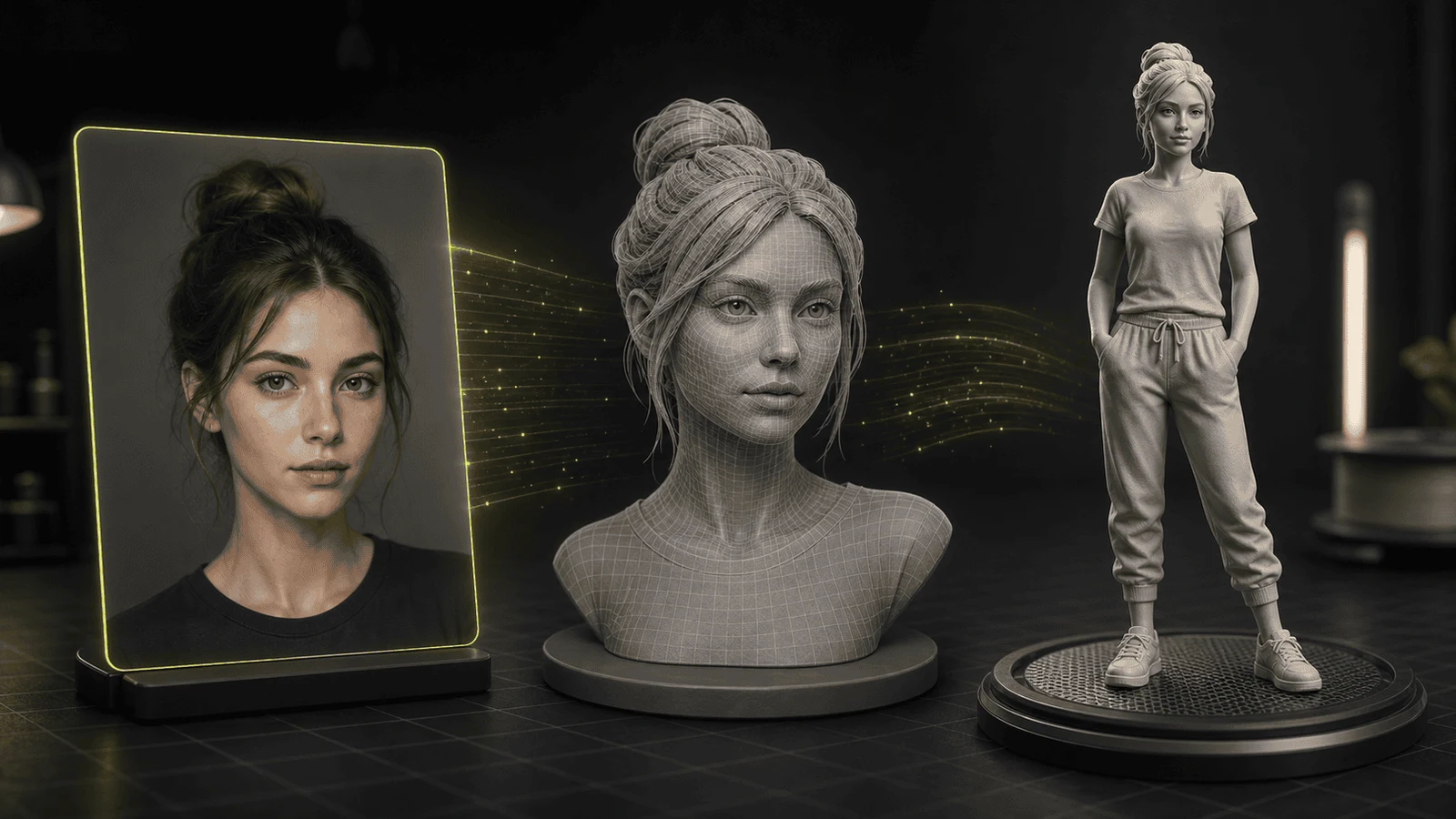
Make This Picture a 3D Action Figure: Free 2026 Guide
You can make a picture into a 3D action figure with one photo, a free browser tool, and (optionally) a 3D printer. No scanner, no modeling skills, no software installs. The whole pipeline, photo to printable STL, takes minutes in 2026.
This guide covers the complete workflow: what "3D action figure" should mean for your goal, how to generate the model, how to print it, what it costs, and how to handle the AI-generated action figure images that went viral everywhere.
First, Which "3D Action Figure" Do You Want?
Searches for this phrase split into three different goals, and picking the wrong one wastes an afternoon:
- A stylized image. The viral "action figure in a blister pack" trend: you upload a selfie to ChatGPT, Gemini, or an action figure generator and get a photo of yourself as a boxed toy. It looks 3D but it is a flat 2D image. Great for profile pictures, useless for printing.
- A real printable 3D model. You want an actual figurine: a mesh file you can 3D print, hold, and put on a desk. This is what this guide delivers.
- The bridge. You already made one of those viral AI action figure images and now you want to turn that picture into a real 3D model. Also covered below, because it works exactly the same way.
If you only want the image, any AI action figure generator does it in one prompt. If you want the figure on your shelf, keep reading.
What You Need
- One clear picture of a person, pet, or character (a phone photo is fine)
- A browser (everything runs online, nothing to install)
- A 3D printer or a print service, only if you want the physical figure; the 3D model itself is a deliverable you can share, sell, or use in games
How to Make a Picture Into a 3D Action Figure: 5 Steps
Step 1: Pick the right picture
A single photo drives the whole conversion, so make it count:
- Front-facing subject, whole head and torso (or full body) in frame
- Even lighting, no harsh shadows across the face
- Plain background, or remove the background first; clutter bleeds into the mesh and wastes geometry
- Sharp focus; motion blur becomes melted geometry
- One subject per photo; group shots confuse both the AI and the printer
Step 2: Generate the 3D model
Open Trify3D's image-to-3D tool and upload the picture. The AI estimates depth from the photo, infers the unseen sides, and builds a full 3D mesh. You get a live preview you can rotate and inspect before committing.
Generation takes a minute or two. Free generations are enough to test the whole pipeline end to end.
Step 3: Inspect and clean the mesh
Rotate the preview and check:
- The face (the part everyone looks at first)
- The silhouette against the light for floating bits and holes
- The base; a flat bottom means the figure stands on its own
Small defects are normal for single-photo generation. Most are harmless once sliced. If something major is wrong, usually a cluttered photo, fix the input picture and regenerate; it is faster than repairing a bad mesh by hand.
Step 4: Export as STL
STL is the universal 3D printing format; every slicer reads it. Export OBJ instead if you want to keep colors and textures, for example for color printing or for importing into Blender. Our image to STL guide covers the format tradeoffs in depth.
Step 5: Slice and print
- Resin (SLA) printers capture faces, hair, and fine detail dramatically better. This is the path for display-quality figures.
- FDM printers are cheaper and easier and fine for larger or less detailed figures.
- Stand the figure upright or lay it on its back so supports stay off the face. Use tree supports in PrusaSlicer or OrcaSlicer, and print faces at 0.08-0.12 mm layer height.
No printer? Export the STL anyway and send it to a print service or a local library with printers. If you want the deeper version of this pipeline, see 3D print a person from a photo, which walks through photo prep, sizing, and slicer settings in full detail.
Already Have an AI Action Figure Image? Turn It Into a Real 3D Model
Millions of people generated the viral blister-pack image of themselves in ChatGPT or Gemini. Then they hit the wall: it is just a picture. The search results are full of people asking how to get from that image to something they can actually 3D print.
The good news: that image is a perfectly good input.
- Generate (or dig up) your action figure image. Any style works: boxed toy, stylized character, cartoon version of yourself.
- Upload it to Trify3D's image-to-3D tool exactly as you would a photo.
- The AI treats it as the reference view and reconstructs the character as a full 3D mesh.
- Export STL and print.
Two things to know going in:
- The AI-generated image is a 2D render, so the reconstruction infers the back and sides from the front view, same as with photos. The face you see in the image is the face you get; the reverse is a plausible guess.
- Stylized images convert better than photos in many cases, because they have clean edges, flat colors, and a clear single subject. Viral-style images are close to ideal input.
If you start from scratch instead of a photo of a person, see how to generate a 3D model from an image for the general workflow and tool options.
Static Figure vs. Poseable Action Figure
One honest caveat before you print: a photo-to-3D figure is a fixed-pose statue, like a collectible figurine. It will not move.
A true poseable action figure with articulated joints is a different product category:
- Designed kits. Ball-jointed STL kits on Cults3D and Thingiverse are built to print pre-assembled with moving joints. You print, break the seals, and the figure poses.
- The hybrid approach. Generate your character mesh from a photo with AI, then in Blender attach it to a jointed base or split it into parts with joint holes. More work, but it gets your subject onto an articulated body.
For most people printing their first figure, the static statue is the right goal: it is one pipeline, zero assembly, and it looks great on a desk.
How Much Does It Cost?
Based on typical 2026 retail prices for filament, resin, and figurine printing services:
| Cost item | Typical price |
|---|---|
| PLA filament | $20-$30 per kg |
| Liquid resin | $25-$50 per liter |
| Material per 6-inch figure | under 150 g, so cents to a couple of dollars |
| Pre-made STL files | free (Thingiverse) to $5-$20 |
| Custom sculpting (if you hire out) | $20-$100+ per hour |
| Print services per figure | roughly $30-$100+ |
The math: doing it yourself, a figure costs a few dollars in material plus your AI tool usage, and free tool tiers cover a first print. The expensive line items only apply when you outsource design or printing.
Resin also adds post-processing work: washing prints in isopropyl alcohol and UV curing. That manual labor is a big part of why shop-printed figures cost what they do. For a fuller walkthrough of printing people and figures, see our 3D printed figures guide and the photo to 3D printable statue hub.
Tool Options at a Glance
The current search landscape for photo-to-figure tools, all browser-based:
| Tool | What it does best |
|---|---|
| Trify3D | Photo or image to print-ready mesh, STL/OBJ export straight from the browser |
| Meshy AI | Image-to-3D generation, large feature set |
| PrintPal Face to 3D | Face-focused figurine generation |
| Higgsfield 3D Figure | Photo to stylized 3D figure |
| 3D AI Studio | General image-to-3D conversion |
All of them convert a picture to a mesh. Pick by output format and workflow: if the goal is a 3D print, you want clean STL export and a mesh preview before you commit, which is exactly the path Trify3D is built around.
FAQ
Can I make a 3D action figure from a single picture?
Yes. AI image-to-3D tools estimate depth from one photo, infer the unseen sides, and export a printable mesh. One clear front-facing photo is enough for a display figurine; you do not need a 3D scanner or any modeling skills.
How much does it cost to 3D print an action figure?
Material cost is low. PLA runs $20-$30 per kilogram and resin $25-$50 per liter, while a standard 6-inch figure uses under 150 grams, so a print costs cents to a couple of dollars. Add the AI tool's generation cost, and filament or resin for failures. Paid figurine services charge roughly $30-$100+ per figure.
Is there a free online tool to turn a picture into a 3D action figure?
Yes. Trify3D, Meshy, 3D AI Studio, and PrintPal all run in the browser and offer free generations to start. Trify3D exports print-ready STL and OBJ directly from the browser with no installs.
Can I turn my AI action figure image into a real 3D model?
Yes. The viral action figure images from ChatGPT, Gemini, or any image generator are just 2D renders, but they work perfectly as input for image-to-3D. Feed the generated image into an AI image-to-3D tool and you get a printable mesh of the same character.
Can I 3D print an action figure with movable joints?
Not directly from a photo. Photo-to-3D produces a solid, fixed-pose figure. Poseable figures with ball joints come from purpose-designed STL kits on Cults3D or Thingiverse. A hybrid approach works too: generate the character mesh with AI, then attach it to a jointed base in Blender.
Can you legally sell 3D printed action figures?
It depends on the source. Figures made from your own photos or original characters are generally fine to sell. Selling figures of copyrighted or trademarked characters, including recognizable likenesses, requires a license. Check the license terms on any downloaded STL before selling prints of it.
What kind of picture works best for a 3D action figure?
A sharp, well-lit, front-facing photo of one person on a plain background. Remove busy backgrounds first, because clutter bleeds into the mesh and wastes geometry. Avoid heavy motion blur, hats that hide the face, and group shots.
Make Your First Action Figure Today
The full pipeline is three moves: a good picture, an AI image-to-3D tool, and an STL export.
The fastest way to start is Trify3D's image-to-3D tool: upload the picture (a photo or one of those AI action figure images), preview the generated mesh, and export STL or OBJ for printing. No installs, no modeling, free to start.
Upload a picture and hold your first action figure this week.
Run it yourself in Trify3D
Keep reading from this topic
Albedo vs Normal Map: What Each Stores, When You Need Which
Albedo vs normal map explained: what each map stores, why normal maps look purple, how they work together, and three checks to tell them apart.
TutorialsTrellis 2 Complete Guide: From Install to Production Workflow
The complete Trellis 2 guide for 2026: pick an install path (ComfyUI or no local GPU), run image-to-3D, text-to-3D, and multiview workflows, fix common errors, and compare Trellis 2 vs Hunyuan 3D.
TutorialsWhat Is PBR Texturing? The 2026 Plain-English Guide
PBR texturing explained: what PBR stands for, the six core maps, the two workflows, and the mistakes that break PBR materials in Unity and Unreal.